


Guides · Start here
How to play Riventale
Open riventale.world, press Kinholds, then New world, choose a world and a path. A new world drops you in the calm middle lands with empty hands. A full day lasts ten minutes, and a little under half of it is night: the pause menu shows how many minutes are left until night or dawn.
Start a world
On your first visit, the title menu shows one big Play: one tap starts a Medium world, with Rivet to show you the basics. After that, worlds start from Kinholds > New world.
Create a world comes first: pick the world it will be (every one below), then Choose your path: how hard the world fights back. You can make other worlds later: Kinholds hold five.
Kinds of world
| World | What it is |
|---|---|
| Riven Wilds | The land as the Riven Lands have it: every biome, caves, ruins and wrecks. |
| SMP | Riven Wilds on our server for up to 30 players, kept for good. Its owner keeps it: see playing together. |
| Sky Islands | Islands of grass and forest floating over an open sky, their undersides rich in ore, the rarest at the tips. Everyone glides and keeps their items, until you change it. Each isle has a name, and the world panel counts the isles found. |
| One Block | One block in the void. Break it and it comes back as something new, climbing from The Meadow through The Old Wood, The Stone, The Frost, The Deep and The Ember to The Riven Heart. Now and then it is a chest, or something climbs out. Everything you build starts there. Its keeper can send the block back to any phase already reached with /phase. |
| Flat | Level grass over dirt and stone, with the odd tree: room to build. |
| One Land | One biome everywhere: Forest, Pinewood, Snow, Desert or Plains. |
| Archipelago | The land drowned to a sea of islands. Boats help. Each isle has a name, and the world panel counts the isles found. |
In Sky Islands and One Block, a fall past the bottom is a death in the void.
In Sky Islands and the Archipelago, set foot on an isle and it is found: the world panel shows its name, how many isles the world has found and how many you have. The first foot on an isle finds it for everyone. Tap the panel, or type /world, for the latest isles found and who found each.
Creative worlds
On our server, any kind of world can be made Creative: choose Creative under the worlds as you make it. Its keeper builds there in creative mode with the Builder's Lens, and so do the players the keeper adds with /builders add; everyone else plays survival. Nothing earned in a Creative world counts anywhere else: no achievements, pages, Path or earned looks. It stays Creative for good.
| Path | Hunger | Monsters | Starving |
|---|---|---|---|
| Easy: the Wanderer | None. Food heals you directly. | Half damage, and fewer of them | Never happens |
| Medium: the Adventurer | Hunger: the ember bowl. You heal while it is nine-tenths full or more. | Normal damage | Stops at half a shard |
| Hard: the Unyielding | Hunger, as on Medium | One and a half times the damage, more of them, bosses act more often | Can kill you |
World rules
World rules on Create a world sets that world's rules and switches. Each starts at Normal, or at the world's own (Sky Islands, One Block):
| Rule | Choices |
|---|---|
| Creatures | Fewer, Normal or More (half as many, or three quarters more) |
| Creature damage | Low, Normal or High (half, or one and a half times their hits, on top of the path) |
| Day length | Short, Normal, Long or Frozen (a day of 5, 10 or 20 minutes; Frozen stops the sun where it is: set the hour first with /time) |
| On death | Drop items, or Keep items (your bag stays with you) |
| Gravity | Low, Normal or High (Low: jumps go higher and falls land softly; High: the opposite) |
| Jump | Normal, High or Mighty (twice or four times as high; landing from your own jump never hurts) |
| Glide | With wings, or Everyone (hold jump in the air to glide, no Elemental Wings needed) |
| PvP | On or Off (Off: no player can hurt another; creatures still bite) |
Change them later from the book button beside a world in Kinholds, or in the world with /rules: /rules alone lists them, and /rules days long (or creatures, damage, death, gravity, jump, glide, pvp, blasts) sets one. Only the world's owner can. /world says what world you are in and its rules. Guests see the rules that differ from Normal when they arrive. The Riven Lands keep one set for everyone.
Under the paths is an I'm new button. Turn it on and Rivet, a small Firstfolk scout, walks you through the basics in your new world. New single-player worlds open with a short story scene; you can watch it again from the Journal's Story tab. On a computer, click the game to start moving.
Choose your calling
A new character picks a calling when it first steps into a world. A calling gives a small first kit and a free outfit, and nothing else: every calling can learn spells, draw a bow and use any blade. A character from before callings arrived is asked once, the first time it comes back. Decide later leaves the choice in the Journal.
| Calling | First kit | Outfit (free) |
|---|---|---|
| Warden | Stone Sword, Wooden Helmet, Wooden Chestplate, 4 Bread | Warden Tabard: an iron-grey tabard over mail with the gold Crystal crest, leather pauldrons, a crimson half-cape |
| Wayfarer | Recurve Bow, 16 Arrows, 4 Bread | Wayfarer Cloak: a green hood and travelling cloak, a leather jerkin, archer’s bracers, the quiver on the back |
| Arcanist | A Dawnspar Focus and a first spell (Rimeshard or Cinderbolt), 4 Bread | Arcanist Robe: a deep violet robe with silver runes at the hem, a short mantle, a pale glow at the hands |
| Shade | Stone Dagger, 3 Cookies, 4 Bread | Shade Wrap: a charcoal wrap crossed with straps, a hood and half-mask, a red scarf |
The kit comes once per character. Change your calling any time in the Journal's Calling tab: the new calling's outfit joins your Looks and you keep the old one, but there is no second kit. Kit items that don't fit in your bag wait in the Calling tab until you collect them.
Your first day
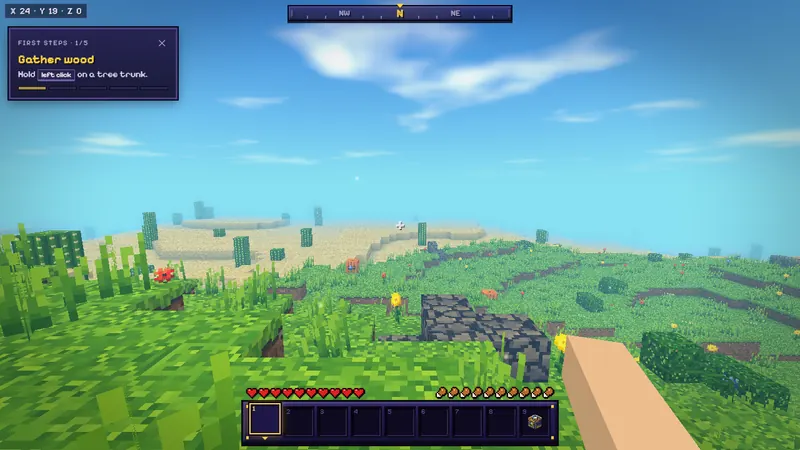
Until you have done them, the top left corner lists five steps. They are the shortest path to a working pickaxe:
- Gather wood. Hold left click on a tree trunk (on a touch screen, press and hold). Oak, birch, pine and jungle logs all work the same. With an axe, chop the lowest log and the whole tree comes down: see felling.
- Make boards. Press E and put a log in the 2×2 crafting grid: one log gives four Oak Boards.
- Build a Maker's Bench. Four boards in the 2×2 grid. Place it on the ground and right click it to open the 3×3 grid.
- Craft a pickaxe. First make hafts (two boards, one above the other, give four). Then three boards across the top row and two hafts down the middle column.
- Mine some stone. Dig down to grey stone. It drops Fieldstone, the first building stone and the material for stone tools.


Tools never wear out in Riventale, so one pickaxe lasts until you replace it with a better one. Make a stone pickaxe, axe and sword as soon as you have Fieldstone: stone is the tier that can mine iron ore.
What to gather on day one
 Logs, plenty of them. Twenty logs is a good first haul: boards for the bench, hafts, a chest and a first shelter.
 Fieldstone. A few stacks. Eight of it makes a Forge.
 Coal. Black-speckled stone near the surface and down to deep caves. A wooden pickaxe can mine it. One coal and one haft make four torches.
 Food. Pigs and cows drop raw meat, chickens drop raw chicken and feathers. Hedgeberry bushes grow in forests and pine woods; wild carrots and potatoes grow on the plains; pumpkins and melons sit in the grass.
 Sand. Smelted in a Forge it becomes glass, for windows and later for farglasses.
Raw meat is edible, but roasted it restores almost three times as much. Roast Pork and Roast Beef are the best common foods; Bread (three wheat in a row) is next.
Felling trees
With an axe in hand, chop a tree's lowest log and the whole tree comes down, falling away from you. It takes as long as chopping every log one by one, ten seconds at most; it saves the climb and the clicks. The logs, a few hafts and now and then resin go straight into your bag, and what doesn't fit lies in one pile at the stump.
- Sneak (Shift) to chop just one log, for shaping wood when you build.
- A sapling of the same kind takes the stump, and about ten minutes later the same tree stands there again. Bare dirt left behind greens over.
- Leaves you break now and then drop a sapling. Plant it on turf or dirt and it grows into a young tree you can fell too.
- Logs you placed never fell, and nothing comes down inside someone else's claim.
 Resin above a haft makes four torches, like coal.
- Settings > Gameplay turns Felling and Replant off. The Riven Lands always replant, so the shared forests last.
The first night
At night, monsters rise on the surface, on top of whatever block is highest, so a roof keeps them off the floor beneath it. Six blocks or more under the land they rise at any hour, wherever it is dark. Light keeps them away: nothing rises within seven blocks of a torch.
- Fastest shelter: dig three blocks into a hillside, step in and put a block back behind you.
- First house: a 5×5 room of boards or Fieldstone, two blocks high, with a roof and a torch. Put your bench, a chest and a Forge inside, and hang a door once you have boards to spare.
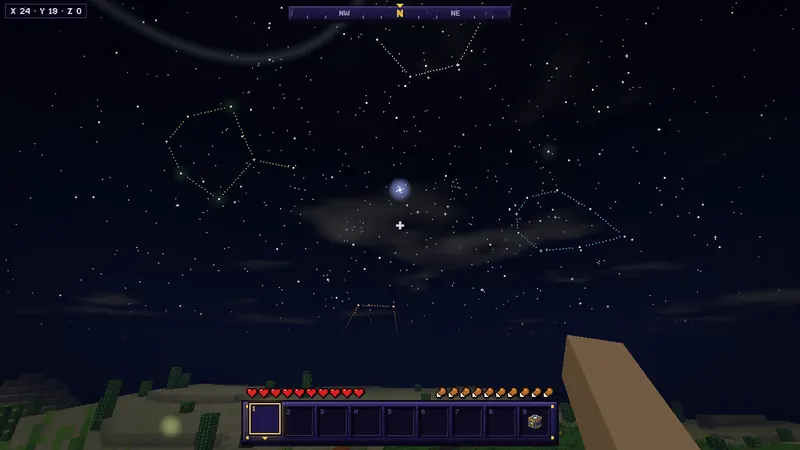
The night monsters of the middle lands are the Waned (walks at you and hits), the Slagcaster (keeps its distance and throws molten slag) and the Rivenmaw (fast, low, climbs walls and springs). The Waned and Slagcasters catch fire in daylight under the open sky. In the desert most of what comes out is the Dustwaned, which does not burn and whose hits make you hungry; in snowy lands it is the Rimewaned, whose hits chill you. Deep caves below Y −20 also hold Gloops, which split into Glooplings when hit.
Hit a monster while falling from a jump for a critical hit. If you would rather not fight, stay in: the night passes in under five minutes.
Torchlight and Torchsight
No hostile creature rises where the light is strong enough. Light fades one step per block through open air, so each light keeps a ring around it safe:
| Light | Keeps creatures from rising within |
|---|---|
| Torch | 7 blocks |
| Lantern | 8 blocks |
| Homefire | 6 blocks |
| Glowcaps and other faint glows | 4 blocks |
| Bedroll | 2 blocks |
A torch every dozen blocks keeps a tunnel safe. Hold a torch to see Torchsight: violet marks on the ground within 8 blocks that is still dark enough for creatures to rise. Open ground is marked at night; caves at any hour. Settings > HUD > Torchsight turns the marks off. Light never stops a boss, a Shardborn or a Foundry warden.
The Forge
Eight Fieldstone in a ring at the Maker's Bench make a Forge. Right click it: ore goes on top, fuel below, and the result comes out on the right. Each item takes five seconds. A piece of coal burns for forty seconds, enough for eight items; a log or a board burns for one and a half items. No coal yet? Smelt a log into charcoal: it burns as long as coal and makes torches too.


Iron ore becomes iron ingots, and iron gives the next tools, armour, a compass, lanterns and track. The crafting guide has the full smelting and fuel tables.
Doors and ladders
Six Oak Boards in two columns of three at the Maker's Bench make two Oak Doors. Seven hafts in an H make three Ladders.
- A door stands two blocks tall and faces you as you place it. Right click (or tap) to open or shut it. Two doors side by side in one wall open together.
- A shut door stops creatures. It never shuts on someone standing in it. Inside a claim it opens only for those who may build there.
- Break either half and the whole door comes back. An axe is quickest.
- A ladder goes on the side of a solid block. Hold forward to climb, let go to slide down, sneak to hold still. No fall hurts you on a ladder.
Slabs and stairs
At the Maker's Bench, three of a building stone in a row make six slabs, and six set as a stair (either way round) make four stairs. Fieldstone, Mossy Fieldstone, Stone Bricks, Mossy Stone Bricks, Dressed Stone, Granite, Chalkstone and Greystone, Bricks, Sandstone, Cobbled Slate, Slate Bricks, Skystone Bricks and Oak Boards each have both.
- A slab fills the lower half of its block. Aim high on a side, or at a ceiling, and it fills the upper half.
- Set a second slab of the same stone into the empty half and the two make the whole block again.
- A stair turns its low side to you as you place it, so face the way you will climb. Aimed high on a side, it hangs upside down. Stairs set side by side turn corners.
- Walk up a slab or a stair without jumping. Creatures climb them too.


The Builder's Lens
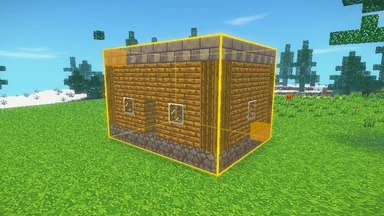
In creative, in your own worlds, the Builder's Lens builds big: mark a box, then fill it, hollow it, copy it, or set it down again turned and mirrored. Press I to open it (on a phone, the lens button in the toolbar at the top left). Its bar sits over the hotbar. It never works in the Riven Lands.
| Tool | What it does |
|---|---|
| Select | Click a block for the first corner and drag to the second, or right click the second (on a phone, tap one corner, then the other). The box shows its size. Then Fill it with the block, Replace one block with another, Hollow it into a room, raise its Walls, or Clear it. Copy and Cut take it to your clipboard. |
| Paste | A ghost of the clipboard stands where you aim. Turn it a quarter, Mirror it, choose whether its Air clears what is there, then click (or tap) to set it down. Keep saves it as a blueprint. |
| Brush | Shapes the land under a gold ring: Raise, Lower, Smooth, Flatten to the height at its middle, or Paint the surface with the block. Hold to keep shaping. [ and ] change its size, - and = its force; on a phone, pinch. |
| Blueprints | Your kept builds, by name. Paste one into any of your worlds. On our server they follow your account; in single player they stay in this browser. |
The block the Lens sets is the block in your hand, or any block from its picker (N, or tap the block on the bar). Undo (Z) and Redo (Y) step back through your last forty operations in that world. On a keyboard, R F G H B press the bar's five buttons in order, Tab steps through the tools, and C and X copy and cut.
One operation changes up to 50,000 blocks, and a box can be 256 blocks long. Big ones finish over a second or two, and the bar shows how far they are, with Stop. Chests, display shelves, Forges, Hearth Pots, Homefires, Bedrolls, cairns, claim stones and the world's shrines and lenses are never touched.
In a private world on our server, its keeper builds with the Lens, and so do the players the keeper allows: /builders add <player>, /builders remove <player>, and /builders alone lists them. Guests can't use it. A moderator's rollback undoes Lens work like any other building.
Fences, walls and gates
Fences and walls join what stands beside them: each other, gates and whole blocks. They stand a block and a half high to anything that walks into them, so no jump clears one and creatures never try. A fence holds a field; a wall holds a keep.
- An oak fence: two rows of boards with a haft between, at the Maker's Bench, make three.
- A wall comes in every building stone that has slabs: six in two rows make six walls.
- A fence gate spans its block across the way you face as you set it. Use it to open it, and again to shut it. It will not shut on someone standing in it.


Trapdoors, panes and bars
- A trapdoor set on a floor lies flat. Set high on a side, or under a ceiling, it sits at the top of its block. Use it to open it: it stands up against its hinge, the block it was set against. Iron ones open by hand too.
- Glass panes and iron bars are thin. Each joins the panes, bars, walls and whole blocks beside it; one on its own stands across the way you faced.


Scaffolding
Six hafts and a Seamcord make six scaffolds. Scaffolding stands on the ground or on scaffolding; set one against a scaffold and it goes on top of the column.
- Inside it, jump to climb and sneak to go down. Let go of both and you hold where you are. No fall hurts you in it.
- Break the bottom one and the whole column comes down, each scaffold dropped to pick up again.


Furnishing
Signs, display shelves, chairs, tables and carpets make a shelter a hall. All of them are made at the Maker's Bench.
- A sign stands on its post when you set it on the ground, and hangs on a wall when you set it against one. Carve up to four short lines into it as you set it down; use it again to change them. Only you, or the owner of the land, can change your sign, and its words follow the chat rules.
- A display shelf holds three things on show. Use it with something in hand and one goes on the spot you aim at; use a full spot to take it back. On claimed land, only those who may build there can.
- A chair turns its seat to you as you place it. Use it to sit, lower and facing out; move or sneak to stand. Chairs come in Oak, Birch, Pine and Jungle wood.
- Tables of the same woods, set side by side, join into one long top with legs only at its corners.
- A carpet lies thin on the floor in any wool colour. You walk onto it without a step.


Reap and sow
Right click (or tap) a ripe crop to reap it: the harvest goes into your bag and one of its seeds goes back into the soil. Wheat, carrots and potatoes all work this way. Ripe crops glint (Settings > Video > Ripe glint).
Fields keep growing while you are away: a field you come back to has caught up on the time it missed, up to ripe. Settings > Gameplay > Replant turns reaping and sowing off.
Your home
A row of three Fieldstone, then Fieldstone, a torch and Fieldstone, then three logs make a Homefire. Set it down and it is home: up to four for everyone, and a fifth makes your oldest an ordinary fire again. Break one and that home is gone. You wake at the one you set down last. Its smoke climbs over your roof and marks home on the sky and the compass, and sitting beside it keeps the cold and hunger off.
Two White Wool (or two Wheat) above a haft and a torch make a Bedroll. Lie on it and you wake there after dying, until it's broken. At night it rests: alone in a world the night passes to dawn, in a Kinhold it passes when half of you rest, and in the Riven Lands it only sets where you wake.


Your compass takes you home: hold it and right click (on a phone, tap the world), then pick a Homefire or the world spawn; each says how far it is and which way. Everyone is given a Wayfarer's Compass, and a death never takes your last compass. A Maker's Bench, a Forge and a Hearth Pot take what they need from chests within 6 blocks.
Finding your way
Cairns
Three Fieldstone stacked in a column make two Cairns. Place one, give it a name of up to 24 characters, and pick its band's colour: Gold, Ember, Blood, Rose, Violet, Sky, Moss or Bone. Use it again to rename it and put its light out.
Your cairns ride on the compass strip, wherever they are. Face one and its name and distance show under the strip, in place of your coordinates. You can raise 20 in each world. Only you see your own cairns on the strip; anyone may break one outside a claim.
The Wayfarer’s Atlas
Three Wheat (or three Seamcord) over a piece of coal or charcoal make the Wayfarer’s Atlas. Press M with it in your bag, or hold it and right click (tap on a phone).
It maps the land your game has loaded around you, as you go: your homes, your cairns and their names, a skull where you fell, your friends, and you as a gold arrow. Drag to pan, scroll or pinch to zoom, and the compass button brings the map back to you. The Atlas is kept in your browser for each world.
Finding the far places
In single player (and for a server's operators), /locate cradle (in the Elemental World) and /locate foundry, /locate cinderwrack or /locate siphonworks (in the Firstfolk Wastes) give the way to the nearest Shard Cradle, Lens Foundry, Cinderwrack or Siphonworks (the mouth of its adit), and /locate sea to the middle of the nearest sea: its coordinates, how far, and which way.
Dying and getting your things back
When you die, everything you carried drops where you fell and stays there for ten minutes. A skull on the compass strip at the top of the screen shows the direction, the distance and the time left, and a gold column of light rises from the spot. Respawn, follow the skull and touch the pile: it all comes back at once. Your last three deaths stay marked, even after a reload. Later, a farglass can carry you straight to where you last died.
The death screen offers your Bedroll, Homefire and homes beside Respawn (keys 1 to 3). One compass always stays with you; in a world whose rules say Keep items, everything does.
Saving
Single-player worlds save in your browser on their own every few seconds; a small Saved mark flashes at the top right. The pause menu says when the world was last saved; Leave world returns to the title screen, and Continue brings you back. In Kinholds you can rename a world, download it as a file to keep a copy, and load a world file back into a free slot. Clearing your browser's site data deletes saved worlds, so download a copy of a world you care about.
Your bag and chests
Your bag (E, or the bag button on a phone) holds five rows of eight; the ember slot is the last of them. Your gear is worn on your figure: each piece has its socket beside the part it covers, and Shift+click puts a piece straight on. Under the bag sits your satchel as your screen shows it, the off hand first, then sockets 1 to 6. The crafting grid is beside your figure, and the recipe book opens with Recipes.
Locked slots and the ember slot
- Alt+click a slot to lock it (on a phone: the ⇄ button, then press and hold a slot, then Lock). A padlock shows in its corner, and Sort, Stow, Restock and quick moves leave it alone. A death still drops what it holds.
- The ember slot, the last of the bag’s slots, burns what you leave in it when the bag closes. Until then, click it to take the stack back.
- Scroll over a stack to move one item across: into the open chest, or between the satchel and the bag. Scroll the other way to pull one back.
- Shift+double-click a stack to move every stack of its kind at once.
Wide chests, names and Find
- Two chests side by side open as one wide chest of 54 slots. A third beside them leaves all three single.
- Rename at the top of a chest names it (up to 32 characters). Keen Eye shows the name when you look at it.
- Find in a chest’s heading lights the slots that match what you type, and dims the rest.
- An item’s card in the recipe book has Find too: chests within 16 blocks that hold it, and that you have opened before, glow gold through the walls for five seconds.
The Laden Chest
Sneak and break a chest that holds anything, and it comes away whole as a Laden Chest, with everything in it and its name. Set it down and it is a chest again, all in place. It rides in your bag or satchel, never inside another chest, and the ember slot refuses it. It is never dropped: set it down to leave it.
Controls
Every key can be changed in Settings > Controls > Keys, with two keys per action. Settings open from the title screen (top right) and from the pause menu, and your browser remembers them.
Keyboard and mouse
Click the game to capture the mouse; Esc lets it go and opens the pause menu.
| Key | Action |
|---|---|
| W A S D or arrow keys | Move |
| Mouse | Look around |
| Space | Jump, swim up; in the air with a thrumpack, fly; falling with wings, glide |
| R or Ctrl | Run |
| Shift | Sneak: you will not fall off edges; also gets you out of a boat or rail cart |
| Left click (hold) | Mine a block, attack |
| Right click | Place a block, use, eat, read a page, revive a friend (hold) |
| Right click (hold, then let go) | With a bow: draw and shoot. With a crossbow: hold to load, click to shoot |
| Right click (with a Dawnspar Focus) | Cast the spell it holds; hold to keep casting. See magic |
| Middle click | Pick block: select the block you are looking at from your satchel or bag |
| 1 to 6, scroll wheel | Choose a satchel socket |
| The key left of 1 | Swap what you hold with your off hand (in the bag: the slot under the pointer) |
| E or Tab | Inventory and crafting |
| Q | Drop one item; Ctrl+Q drops the stack |
| V or F5 | Change camera view |
| T or Enter | Chat; / opens chat with a command |
| J | Journal: the Path, achievements, Torn Pages, the story, your numbers in this world |
| F | Friends |
| G | Wright squad orders |
| Z | Stow nearby: your bag’s stacks into every chest within 6 blocks that already holds them |
| P | Share a moment: a framed picture of what you see, without the HUD |
| M | The Wayfarer’s Atlas, when one is in your bag |
| U (hold) | Zoom |
| F1 | Hide the HUD; again to bring it back |
| I | The Builder’s Lens, in creative in your own worlds |
| K | Hide First steps (the Journal brings them back) |
| . | Throw a fireball while wearing the Fire Chestplate |
| C | With a Dawnspar Focus: the next ready spell |
| B | Spell book: choose your three ready spells |
| Y / N | Accept or refuse a teleport request |
| F3 | Debug information |
| Esc | Pause menu: settings, invite, leave the world |
Inventory shortcuts
- Click picks up or puts down a stack; right click takes half, or puts down one.
- Shift+click moves a stack between bag and satchel, into or out of a chest, ore and fuel into a Forge, armour onto your body.
- Double click a stack to gather every matching item into your hand. Shift+double-click moves every stack of its kind.
- Scroll over a stack to move one item across; Alt+click locks a slot. See your bag and chests.
- Drag a held stack across slots: left button splits it evenly, right button puts one in each.
- Press a number key over a slot to swap it with that satchel socket, or the off-hand key to swap it with your off hand.
- Sort buttons tidy the bag (the satchel stays as it is) and an open chest. Stow, beside Sort, puts every bag stack the chest already holds into it.
- A satchel stack that runs out restocks from your bag. In the recipe book, Make 1, 5 or all crafts straight into the bag, and each item’s card shows what it goes into and where it is found.
Chat commands
Type /help in chat for the list. The everyday ones: /home to go to the Homefire you set down last (/home 2 and on for the others), /spawn, /players, /trust and /untrust (who may build on your claimed land), /claims, /tpaccept, /tpdeny, /wrights with an order, /team with a colour, /msg with a name to whisper, /r to answer the last whisper, /me, /sit to sit where you stand (or use the top of a slab or a stair with an empty hand), /world (what world you are in, who is here, its rules), /relics (where each of the Kept is), /emberhold to find the Hearthgate, /forgebreak or /riftfall in a round of those modes, and /course for a world’s Riftways. In single player, and for a server’s operators: /weather clear, rain, thunder, hail or sandstorm; /time day, noon, night, midnight or a time like 18:30; /tp with a name or coordinates; /give with an item’s name as one word (/give farglass 2) and /effect with an effect’s (/effect nightsight 60); /clear, /seed, /locate, /boss shadow (it calls Isembard’s Shadow over you, at night) and /machines (how hard the world’s machines are working). A private world’s owner keeps it: /filter off turns its chat filter off; /kick, /ban, /unban and /bans deal with guests there; /time, /weather and /tp work there too. /rules shows a world’s rules and switches; in your own world, /rules days long (or creatures, damage, death, gravity, jump, glide, pvp) changes one (blasts off stops a Blastcharge breaking blocks there), and /builders add with a name lets a player build with the Builder’s Lens. The Riven Lands keep one set for everyone. In a One Block world its keeper sends the block back to any phase already reached with /phase (/phase latest follows the newest again). In chat, the up and down arrows bring back earlier messages and Tab completes commands, item and effect names, and player names.
Touch: phones and tablets
Turn your phone sideways: Riventale plays in landscape.
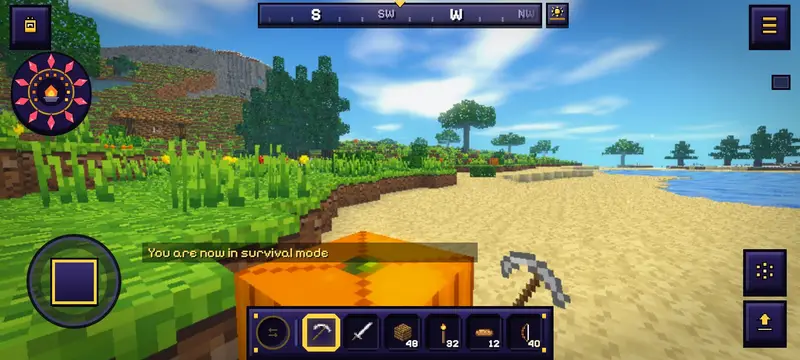
- Move: the joystick at the bottom left. Push it to its edge to run, or push forward twice quickly.
- Or the D-pad: Settings > Controls > Move with: D-pad. Press between two arrows to walk diagonally, and slide your thumb from one arrow to another to turn without lifting it. Tap up twice and hold to run; tap the middle twice to sneak.
- Look: drag anywhere else on the screen.
- Use or place: tap. Mine or attack: press and hold; a ring fills under your finger.
- Jump: the big button at the bottom right. Sneak shows beside it where it matters: at the edge of a drop, with a block in hand, flying or climbing.
- The wheel: the button above Jump. Chat, the camera view, zoom, mark, share a moment, hide the HUD, sneak and your emotes. While zoom, a mark or a hidden HUD is on, the button shows it; tap it to end it.
- Drop: hold a hotbar slot until its ring fills, then slide up and let go: a short slide drops one, a long one the stack. Letting go without sliding drops nothing.
- What you hold has its own button: a bow shows Draw (hold, slide to aim, lift to shoot; see weapons), a Dawnspar Focus Cast (see magic), a rod Cast, a block Place. With the Fire Chestplate on and nothing else in hand, Fireball.
- The bag is at the top left, with Wright squad and the Builder’s Lens beside it when you can use them. ☰ at the top right opens the menu.
- Arrange controls: in a world, pause, open Settings > Controls and drag the buttons where you want them. Tap one to size it; Sneak, Wright squad and the Lens can be hidden (they stay in the wheel). Portrait and landscape keep their own places.
Settings, tab by tab
| Tab | What it holds |
|---|---|
| Video | Graphics (Low: plain sky and still water; Medium: swaying plants, shiny water, torch glow; High: clouds, stars, colour grading and bloom), render scale 50-100%, view distance 2-10 chunks, field of view 60-110°, Ripe glint, boss cinematics, and on a phone the battery saver |
| Controls | Mouse sensitivity, invert look, auto-jump, toggle run and sneak, and every key, with a search box; on a phone, touch look speed, joystick or D-pad, control size and opacity, Hold to repeat and vibration |
| HUD | Coordinates, the compass strip and its marks, Keen Eye, the Path, damage numbers, danger hints, land names, the threat edge, the feast line, gear glance, the placement ghost and Torchsight |
| Sound | Master, Music, Effects and Ambience volumes, and Mute |
| Comfort | Reduced motion, view bob, colour-blind safe colours, button size, subtitle size and UI scale |
| Gameplay | Restock, Felling, Replant (and reap and sow), Take back (a block you placed a moment ago breaks at once and comes back), Ready hand (the right tool comes to hand when you mine) and Vein sense (sneak while mining an ore to follow its vein) |
| Chat | Text size, how long lines stay, timestamps, faces, hide chat, and the players you have muted |
The HUD
- The medallion (bottom left; top left on a phone): your life is the ring of Crystal shards round it, two life a shard, Live Hearts rimmed in gold. Your food is the ember bowl in its heart and the ten embers round it, two food an ember. Armour shows on the gold shield under it, a Sunapple's ward as a gold halo round it, and your Ether as the arc on its side once you know a spell. Three shards or fewer, and it throbs red.
- The satchel (bottom right; along the bottom on a phone): the round socket holds what is in your off hand (tap it, or press the key left of 1, to swap it with what you hold), then sockets 1 to 6.
- Breath: under water, ten bubbles ring the crosshair (the middle of the screen on a phone) and burst as your air runs out.
- Hide the HUD: F1, or the struck-out eye on a phone. The medallion, the satchel, the compass, chat and your hand all go; press it again to bring them back.
- Zoom: hold U, or the Zoom button on a phone. The view narrows to a third, and looking slows to match.
- UI scale (Settings > Comfort) sizes the medallion, the satchel, chat, bag and menus from 80% to 140%.
- The Chat tab sets the text size, how long lines stay (5, 10 or 30 seconds), timestamps and faces, and lists who you have muted: tap a name to unmute.
- Battery saver (Settings > Video, on a phone): Low graphics, a view of 4 chunks and 30 frames a second, for a long session. Turn it off and your own settings come back.
If the game runs slowly
- Lower View distance first: it has the biggest effect.
- Set Graphics to Medium or Low.
- Lower Render scale to 75% or less: the world is drawn smaller and enlarged.
- Close other tabs. Riventale needs WebGL, which Chrome, Edge, Firefox and Safari all have.
The Path
The Journal (J) opens on the Path: three goals chosen from where you are, each with a reward for home or the road (torches, boards, a chest, track, a Bedroll, a Farglass). Next step is the next thing to do on the way forward. Wander is something to find or gather. Hearth is something for your home. Finish one and the next takes its place. Once First steps are done, the next step stays at the top left while you play; Settings > HUD > Path hides it.
- The Dawn errand is a bigger task. Finish it for a Dawn Seal. A new errand is ready 20 hours after you took the last, and one you leave unfinished waits for you: nothing is lost.
- Set aside swaps a Wander or Hearth goal for another, once a day each.
- Continue on the title menu says what waits in that world: the next step, or Dawn errand ready.
Where to go next
- Find iron and dig deeper for gold and Dawnspar: the depths are in Biomes and lands.
- Learn the recipes that matter: Crafting. Arm yourself: Weapons.
- Open old chests in cabins, desert temples, igloos and dungeons: the first one you open always holds Torn Page I. Read on in the story.
- Press J for the Journal: your Path, achievements, the pages you have found and your numbers in this world.
Next: Crafting. All sections: the guides.